How to Use the Moving Average Indicator in MetaTrader to Determine Market Direction?
Fortunately, the moving average, or average line, is built into the core of the MT4 and MT5 platforms by default, and you do not need to download it separately to access its standard version.
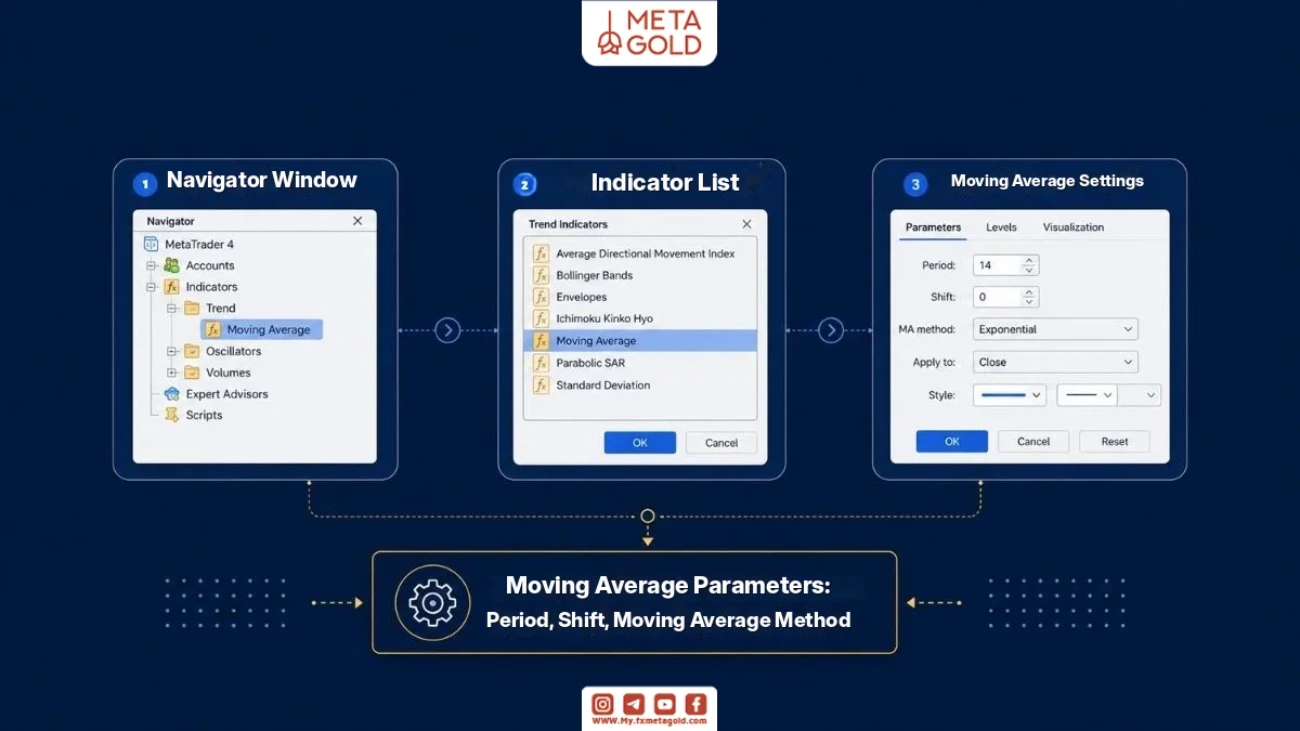
To activate it, simply follow the path Insert → Indicators → Trend → Moving Average from the top menu of the software. Another faster method is to use the Navigator panel; by clicking on the “+” sign next to the Indicators option and entering the Trend section, you can select the Moving Average option and easily drag it onto the chart (Drag and Drop). The settings window that opens consists of three main tabs: Parameters, Levels, and Visualization.
In the Parameters tab, the Period section specifies the number of candles on which the calculations are based, and the Shift section is used to move the line forward or backward. Traders use short-term (5 or 10), medium-term (20 or 60), and long-term (120 or 200) periods based on their strategy.
The most important part is setting the type of moving average (MA Method); the simple moving average (SMA) gives equal weight to all days and is ideal for long-term trends, while the exponential moving average (EMA) and weighted moving average (WMA) are more sensitive to sudden market changes by focusing more on recent prices and are popular with scalpers and short-term traders. If you want to learn more about the mathematical behavior and logic of this tool before implementing it, reviewing the article What is a Moving Average will give you a more comprehensive view.
What is the Difference Between Moving Average Settings in MetaTrader 4 and 5?
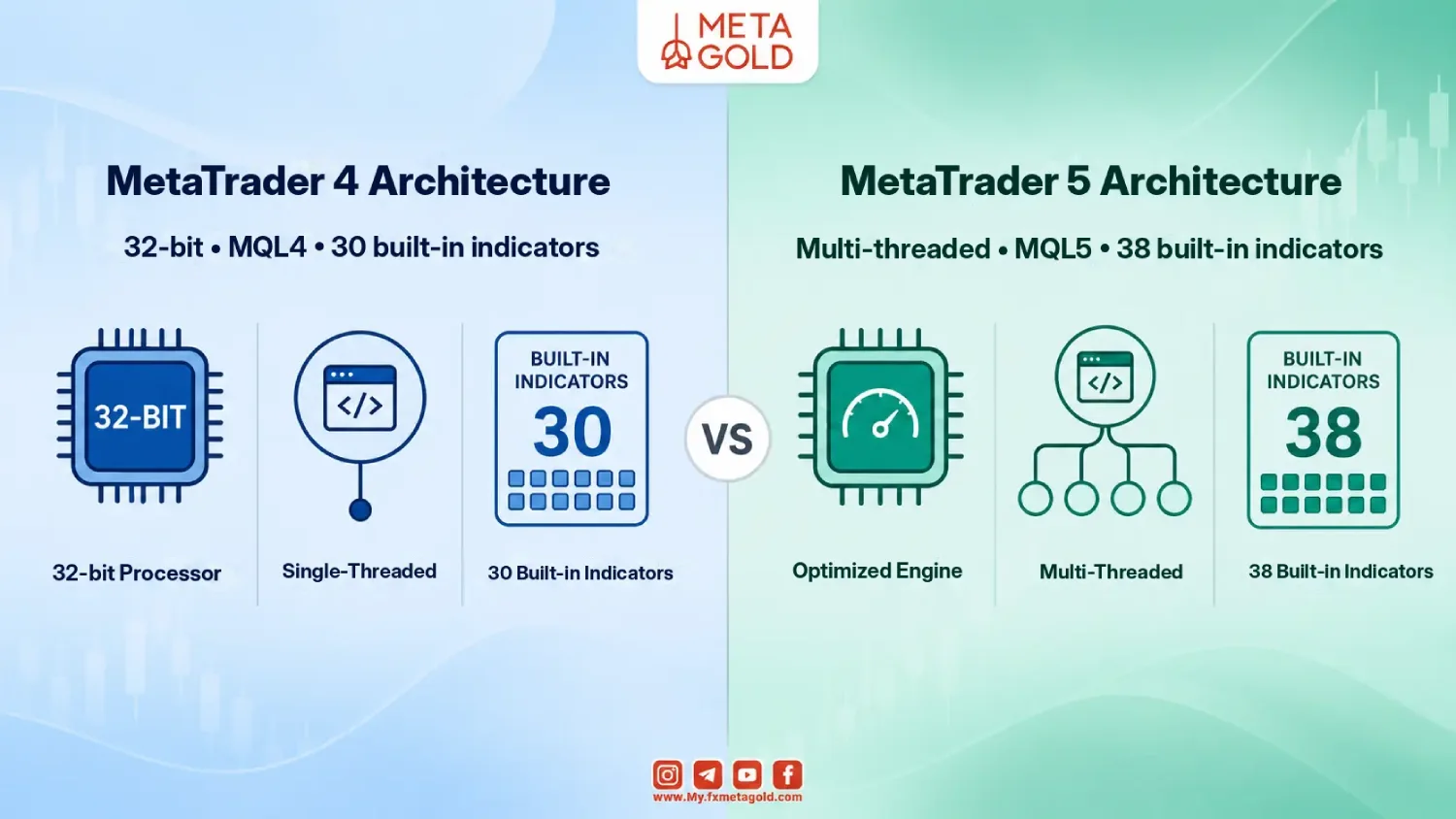
MetaTrader 4 uses the MQL4 programming language, is a 32-bit, single-threaded platform, and its developer, MetaQuotes, has stopped issuing new licenses and updates. In contrast, MetaTrader 5 works with the modern MQL5 language, which optimizes and backtests trading strategies based on moving averages up to 3-5 times faster. In the default version of MetaTrader 4, you have access to 30 built-in indicators, which is enough for standard retail trading strategies.
MetaTrader 5 has expanded this arsenal to include 38 built-in indicators, 44 graphical analysis tools, and 21 trading timeframes (compared to 9 in MT4) to allow for much more accurate tracking of moving averages across multiple time frames. MT5’s flexibility in integrating custom tools also opens up more room for algorithmic and semi-professional traders.
In addition, MetaTrader 5 has powerful additional features such as Depth of Market (DOM), Netting system along with hedging capabilities, and an economic calendar integrated into the terminal itself, which eliminates the need for traders to use external tools for macro analysis; while MetaTrader 4 users are forced to use third-party plugins or resources to access this data.
Moving Average Strategy in MetaTrader
The truth is that success with the Moving Average strategy in MetaTrader is not just about drawing two lines on the chart; it is about understanding the mathematics behind each indicator and choosing the optimal time combinations that define the line between a profitable and a losing trade. In general, traders use two main types of moving averages based on their trading style:
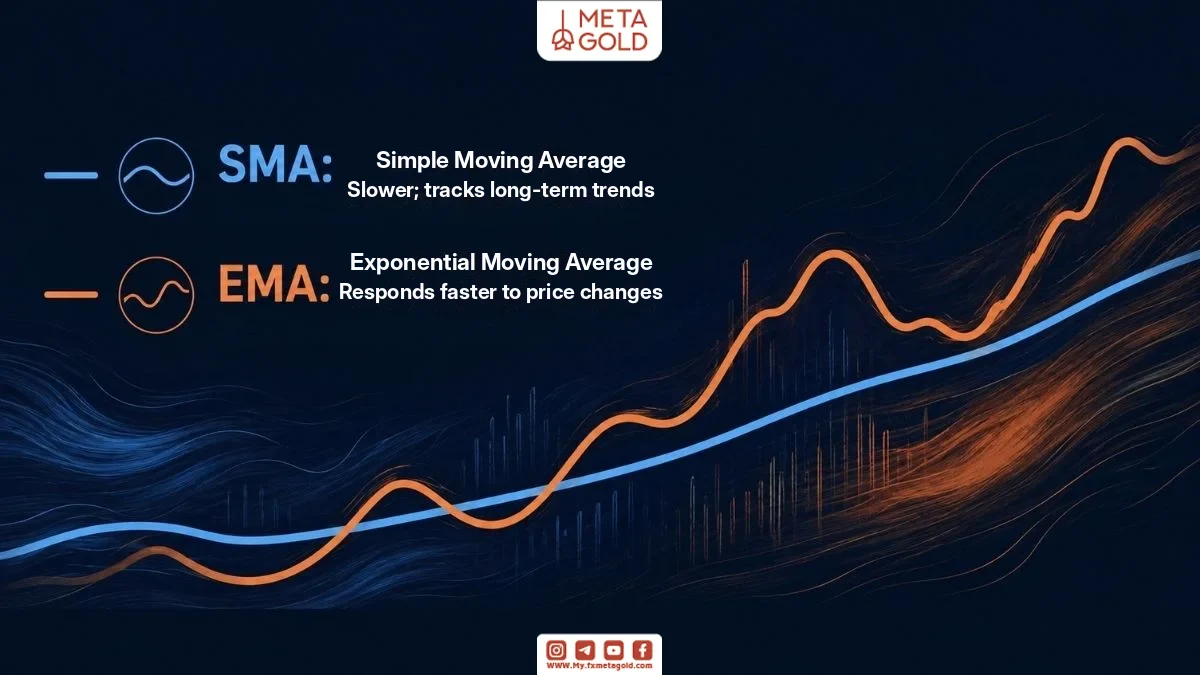
- Simple Moving Average (SMA): This tool gives equal weight to all price data within a specified time frame. If you are looking for a more relaxed and stable approach that focuses on long-term trends and reduces the risk of false signals (whipsaws), the SMA is a good choice.
- Exponential Moving Average (EMA): This indicator gives more weight to recent market prices and, as a result, reacts much faster to sudden price changes. Traders who need faster entries and exits will turn to the EMA, although they should be prepared to deal with more false signals.
Smart Swing Trading with the Double Crossover Strategy
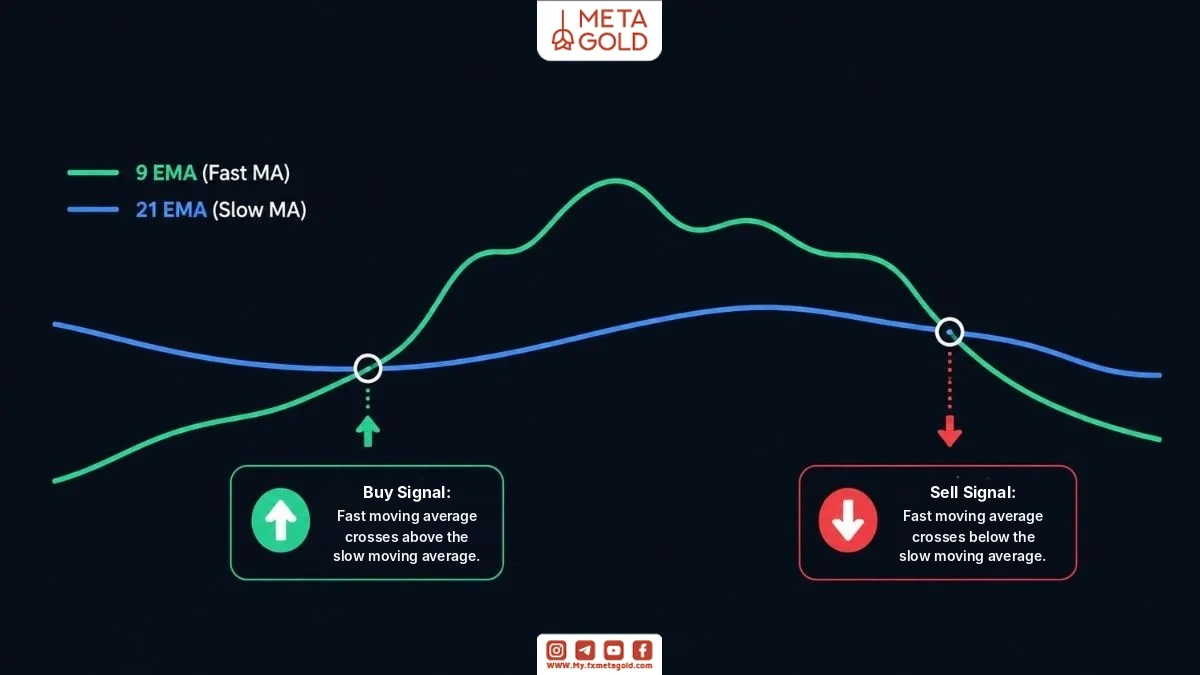
For agile market participants and those looking for day trading opportunities, the combination of the 9 EMA and the 21 EMA works extremely well. Statistical studies on the EUR/USD currency pair on short-term timeframes (such as one hour) show a win rate of around 60% using this combination. In this structure, the trader waits for the faster line to cross the slower line:
- Buy signal: Issued when the faster moving average (e.g. period 9) crosses the slower line (period 21) from below upwards.
- Sell signal: Occurs when the faster line crosses the slower line from top to bottom, signaling the start of a downtrend.
For investors with a medium-term view, the 20 SMA and 50 SMA layout on daily charts provides a much clearer and more reliable picture of market structure. Shorter time frames always produce more signals, but their error rate is high.
Auxiliary filters to suppress error signals
To reduce the frequency of losing trades in the Moving Average strategy in MetaTrader, it is necessary to apply confirmatory filters. Two key tools for this purpose are:
- Relative Strength Index (RSI): Combining a momentum filter like RSI with a crossover strategy (e.g. 10/30 SMA crossover) can help filter out some weak signals in ranging markets.
- Volume: Always monitor market volume at the moment of the lines crossing. The occurrence of volume jumps (so that the trading volume reaches more than 150% of its 20-day average) indicates heavy participation of large traders and confirms the validity of the intersection.
Advanced Triple Crossover Strategy and Automated Experts
In more advanced versions, traders use three moving averages with periods of 20, 50, and 200 to simultaneously identify trend direction, line formation, and entry triggers. This methodology, which is now automated in the form of Expert Advisors in MetaTrader 5, has strict rules:
The price should be above the long-term moving average (200) (confirmation of the macro uptrend). At the same time, the fast line (20) should be above the medium-term line (50), and the medium-term line should be above the slow line (200). The final trigger is activated when a closed candlestick is above all three lines.
These automated systems for dynamic risk control typically use the ATR (Average True Range) indicator to determine dynamic stop-loss limits and adjust the size of each position based on a fixed percentage of capital (e.g. 1%) to protect the trader’s account in the face of sudden market corrections.
Download and install the Moving Average indicator
To start trading and using MetaTrader indicators, users can download MetaTrader 5 with a direct link and easily install it on their system.
The process of installing these tools is very similar in both versions, but the main difference is in the name of the development folder (MQL4 vs. MQL5) and the file extensions. A step-by-step guide to this action is as follows:
- First, download and prepare your custom indicator file.
- Open the MetaTrader software (MT4 or MT5) and click on File from the top menu and then Open Data Folder to open the software’s root window in Windows.
- If you are using MetaTrader 4, go to the MQL4 folder and then Indicators. If you are using MetaTrader 5, follow the path to the MQL5 folder and then Indicators. Downloading the Moving Average indicator for MetaTrader 4 is the same as downloading the Moving Average indicator for MetaTrader 5 for both versions.
- Paste the downloaded file into this section. If your tool is provided as an archive, copy all its contents directly into the MQL4 or MQL5 directory.
- To apply the changes, close the software once and reopen it; or in the MetaTrader Navigator window, right-click on the Indicators section and select the Refresh option.
After completing these steps, to drop the tool onto the chart, simply go to the Insert → Indicators menu and find the name of your new indicator in the list of custom tools and activate it.
Important Tips for Using Moving Average
Choosing the right moving average settings directly depends on your trading style and the cycle you are trying to catch. Professional traders usually use simple moving averages (SMA) to understand the big picture of the market, and exponential moving averages (EMA) for agile and tactical entries, to create a reasonable balance between reaction speed and signal reliability. The table below categorizes the most useful moving average period combinations based on analytical goals and different trading styles:
| Moving Average Type | Common Periods | Suitable Trading Style | Primary Analytical Purpose and Application |
|---|---|---|---|
| Exponential (EMA) | 5 and 10 | Scalping and Intraday Trading | Responding quickly to sudden price movements on very short timeframes |
| Exponential (EMA) | 9 and 21 | Day Trading | Tracking momentum, identifying timely entry opportunities, and generating dual moving average crossover signals |
| Simple (SMA) | 20 and 50 | Swing Trading | Filtering out short-term price fluctuations and identifying medium-term trends on daily charts |
| Simple (SMA) | 120 and 200 | Long-Term Investing and Position Trading | Determining bullish or bearish market bias and identifying key support levels |
Following professional tips in the Moving Average settings in MetaTrader can make a significant difference in the quality of the signals received. The Moving Average indicator in MetaTrader alone is not enough and must be combined with other tools.
Conclusion: Moving Average Settings in MetaTrader
The moving average indicator is a compass for price movement in financial markets; however, its effectiveness depends entirely on how smart you are in applying the moving average settings in MetaTrader. Choosing the right SMA or EMA model, aligning the periods with your trading goals, and using confirmation filters such as volume and RSI will minimize the risk of your positions. To get started and test these tools in a safe environment, you can read the step-by-step guide on the site to learn how to open an account and register with a broker.